Tampilkan postingan dengan label Blackberry. Tampilkan semua postingan
Fancy Characters 2.4
Posted by
Ivan Jaya
at
14.52
If you enjoy your chatting at Blackberry Messenger, than you will be interesting to add your emoticons. I'll share to you an application that named "fancy characters" version 2.4. This application will add more emoticons that you can use at Blackberry Messenger, Twitter, Facebook, etc.
This software is trial version. If you want to get it with a full version, please send me your PIN number from "Contact Me" link or you can buy it. ^_^
Download Here.
How To Upgrade Blackberry OS to OS 6
Posted by
Ivan Jaya
at
12.02
Blackberry has launched the new operating system version 6. But not all devices can be upgraded. Recently I upgrade my BlackBerry operating system to version 6. I use a Blackberry 9700 T-Mobile. If you want to try to upgrade the BlackBerry operating system you can follow the tutorial below, but do with your own risk.
Follow these steps:
Follow these steps:
- Backup data from your blackberry using the Device Manager (DM). You can install the DM from the CD included in the box when you first bought blackberry or you can download it.
- Download and install BBSAK software. You can download it here.
- Download and install Blackberry OS 6. You can download it here (select your service provider and choose your blacberry's type, e.g. Blackberry Bold (TM) 9700 smartphone).
- Go to C:\Program Files\Common Files\Research In Motion\AppLoader, and delete vendor.xml.
- Open BBSAK and click Wipe Device.

Capture Blackberry Screen with "Screen Muncher"
Posted by
Ivan Jaya
at
10.25

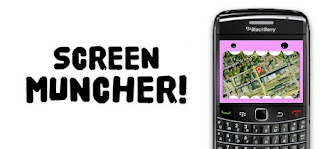
At my previous post "Capture Your Blackberry Screen", I share a software named "Capture It". There is another software that many people used to capture blackberry screen. This software is "Screen Muncher". You can install it online by visiting this address, or you can install it offline by downloading this file.
Don't know how to install it offline?
Read my previous post "Capture Your Blackberry Screen". I hope this software usefull for you. Special thanks to ichelzberry.
Capture Your Blackberry Screen
Posted by
Ivan Jaya
at
16.48

This software can capture your blackberry screen. Install it here. You can capture your blackberry screen with 2 ways:
1. Press blackberry menu and choose "Capture It".
2. Select and press "Capture It" icon.
If you can't install it online you can install it offline by download this file (CaptureIt.zip). Extract the file and copy "CaptureIt" folder to your blackberry (with data cable). Open the jad file ("captureit.jad"), and install the software. You can create blackberry tutorial by using this software.
Angry Farm ( Free Blackberry Game )
Posted by
Ivan Jaya
at
10.16
In my previous post, I wrote about the short tips of blackberry, this time I will share a blackberry game which hopefully can be entertaining. The game is called "Angry Farm". This game is also available in iPhone and Android phones.
For those of you who want to try, please download this game by visiting the following link: Angry Farm. Hopefully useful and entertaining. Leave a comment if you don't mind. Thank you.
Typing Strikethrough Text on Blackberry
Posted by
Ivan Jaya
at
11.18
Continued from the last post (Cleaning Your Blackberry Memory), I'll share an application to typing text strikethrough on the Blackberry. This application made by programmer from Indonesia (iBNuX).
Here is the steps:
Here is the steps:
- Download and install the application here through your blackberry.
- New menu will now appear on the blackberry menu named "Add
Corettext"
- Select "Add
Corettext" menu and type your words that want to strikethrough
- After that press Blackberry menu and select "Paste"

- And your text has been strikethrough.

I hope this tutorial usefull for you. Please leave a comment if you don't mind. Thanks.
Cleaning Your Blackberry Memory (Speed up your blackberry)
Posted by
Ivan Jaya
at
09.18
At my previous post, I write about blackberry tips "Deleted Files Are Still Appear On The Blackberry", and now I want to share a simple tips about blackberry. Some people have a problem with their blackberry. Sometimes and even often, their blackberry become slower and hangs.
If you have the same problem you can try this tips:
- Go to the "options" :

- Select "Security Options" :

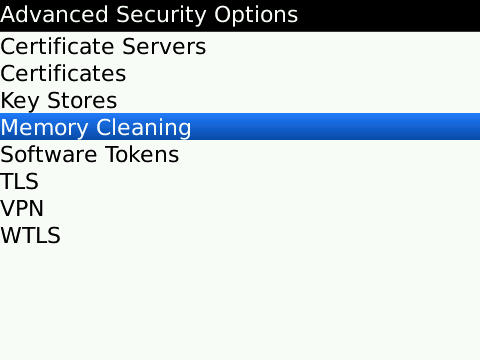
- Select "Advanced Security Options" :

- And then select "Memory Cleaning" :

- At the status choose "Disabled", and then press your BB menu and select "Clean Now" :

Wait until the process done and hopefully your blackberry going to normal and faster. I hope these simple tips useful for you, and leave comments if you don't mind. Thank you.
Deleted Files Are Still Appear On The Blackberry
Posted by
Ivan Jaya
at
11.42

It's been a long time not update this blog, and now I want to refresh my blog with a new post. I will begin by writing a short post and hopefully useful. This tutorial is for Blackberry user.
I used Blackberry for several month and one dayI got a problem. I've deleted some files of music and video but the file name still appears in the music and video player. If the name of the file is opened it will open another file or not open at all.
If you have the same problem, try the following steps:
- Connect your blackberry to the PC.
- Open windows explorer. Go to the storage drive (e.g. drive F:)
- Delete files BBthumbs.dat. This file is located in a folder of music or video. If this file is not visible, on the menu select Tools> Folder Options> View. In the advanced settings, select Show hidden files and folders. OK.
Langganan:
Postingan (Atom)