Tampilkan postingan dengan label Tips and Trick. Tampilkan semua postingan

How To Upgrade Blackberry OS to OS 6

Blackberry has launched the new operating system version 6. But not all devices can be upgraded. Recently I upgrade my BlackBerry operating system to version 6. I use a Blackberry 9700 T-Mobile. If you want to try to upgrade the BlackBerry operating system you can follow the tutorial below, but do with your own risk.

Follow these steps:

  1. Backup data from your blackberry using the Device Manager (DM). You can install the DM from the CD included in the box when you first bought blackberry or you can download it.

  2. Download and install BBSAK software. You can download it here.

  3. Download and install Blackberry OS 6. You can download it here (select your service provider and choose your blacberry's type, e.g. Blackberry Bold (TM) 9700 smartphone).

  4. Go to C:\Program Files\Common Files\Research In Motion\AppLoader, and delete vendor.xml.


  5. Open BBSAK and click Wipe Device.


How To Downgrade Mozilla Firefox


Mozilla has been released the new version mozilla firefox browser. There are several changes that I think it more like Google Chrome browser. After I installed it, I think mozilla firefox take many memory resource that make my computer slow down. After use it for several days, I choose to downgrade my mozilla.

How to downgrade mozilla firefox to the previous one?

Just visit this ftp site. Choose what mozilla's version that you want to install (e.g 3.5). Select win32 and choose your languange. If you want to install the mozilla with English America, choose en-US. Download the mozilla firefox by clicking "Firefox Setup 3.5.exe".

Done. I hope this tips is useful for you that has problem with the new version mozilla firefox.

Typing Strikethrough Text on Blackberry

Continued from the last post (Cleaning Your Blackberry Memory), I'll share an application to typing text strikethrough on the Blackberry. This application made by programmer from Indonesia (iBNuX).

Here is the steps:

  1. Download and install the application here through your blackberry.


  2. New menu will now appear on the blackberry menu named "Add Coret text"


  3. Select "Add Coret text" menu and type your words that want to strikethrough


  4. After that press Blackberry menu and select "Paste"


  5. And your text has been strikethrough.


  6. I hope this tutorial usefull for you. Please leave a comment if you don't mind. Thanks.

Cleaning Your Blackberry Memory (Speed up your blackberry)

At my previous post, I write about blackberry tips "Deleted Files Are Still Appear On The Blackberry", and now I want to share a simple tips about blackberry. Some people have a problem with their blackberry. Sometimes and even often, their blackberry become slower and hangs.

If you have the same problem you can try this tips:

  1. Go to the "options" :


  2. Select "Security Options" :


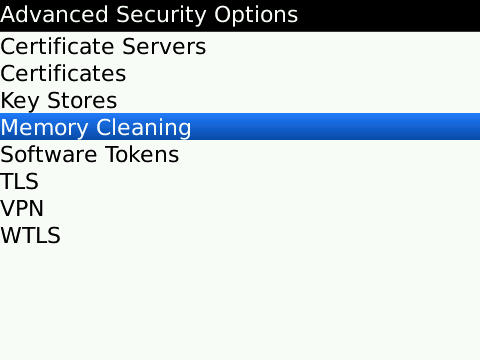
  3. Select "Advanced Security Options" :


  4. And then select "Memory Cleaning" :


  5. At the status choose "Disabled", and then press your BB menu and select "Clean Now" :


Wait until the process done and hopefully your blackberry going to normal and faster. I hope these simple tips useful for you, and leave comments if you don't mind. Thank you.


Deleted Files Are Still Appear On The Blackberry


It's been a long time not update this blog, and now I want to refresh my blog with a new post. I will begin by writing a short post and hopefully useful. This tutorial is for Blackberry user.

I used Blackberry for several month and one dayI got a problem.
I've deleted some files of music and video but the file name still appears in the music and video player. If the name of the file is opened it will open another file or not open at all.

If you have the same problem, try the following steps:

  1. Connect your blackberry to the PC.

  2. Open windows explorer. Go to the storage drive (e.g. drive F:)

  3. Delete files BBthumbs.dat. This file is located in a folder of music or video. If this file is not visible, on the menu select Tools> Folder Options> View. In the advanced settings, select Show hidden files and folders. OK.
I hope this simple tips useful. Thanks.

Create a Free Website With a Website Builder

Today I want to share an information how to create a free website with a website builder. Many way to create a website. You can make it offline with your own PC or notebook or You can also create it online connected with the internet.

At offline mode, you can create website with programming language such as HTML (Hypertext Markup Language), CSS (Cascading Style Sheet), Javascript, PHP (Hypertext Preprocessor), MySQL, etc. At online mode, you can visit a website that give you a free host, subdomain and website builder. I think you've been used a blog engine like blogspot and wordpress. They can help you to create your blog. You can also create your own website for free. You can try this website builder to create a free website. It can help you to create your own website and it's free and search engine friendly.

With the website builder, you don't need to understand the programming language. They give you a free template with various category such as eCommerce, Business, Consulting, Design, Models and Actors, Food and Drinks, Lifestyle, Art, Music, Real Estate, Personal and Myspace. You only need a simply setting. Just drag and drop the widgets that you like and you are ready to post.

I think this is my simple tutorial how to create a free website with a website builder. Be creative and make a good information at your website and share it to other people in the world.

How to Backup Your Blogger Content

How to Backup blogger content? You'll think if that anyway to do that. Not only blogger template that you can backup but you can backup your content too. Backup content is very important. Some website or blog somehow and sometime get a damage risk. Not only from the black hat hacker, virus or server maintenance can cause the damage but the damage risk can caused by the user mistaken. Beside reduce the damage risk, you can also backup your blog content to be a collection. Maybe your blog has many tutorials that needed by people around.

Here is my way:
  1. Download and Install HTTrack.

  2. Open it.


  3. Fill your name project and source folder to save.


  4. Insert your blog address, example: http://ivanjaya.blogspot.com


  5. Next > Finish.

  6. Wait for the process.

  7. Done.
You can also use another blogger program to backup your blogger content like backup blogger. It's very important to do the backup and I hope you backup your blog too.


3 Ways To Get Traffic and Boost Page Rank

If you want to get a good traffic to your blog, you must promote your blog. There are many way to promote your blog. You can follow my blog tutorial below to promote your blog:

  1. Blogwalking and give a quality comment.
    Some blog make their blog dofollow. It means that your blog can get a backlink. If you give a quality comment, another comentators will visit your blog and want to know you closer.

  2. Create a signature with your blog link.
    Create your email and forum signature with your blog link. This will make you recipient want to know your blog and visit you blog. Create a creative and nice signature with your blog link.

  3. Register to Social networks such as identi.ca, twitter, facebook and others.
    With social networks, you can promote your blog. There are many people who want to know you and visit your profile. Make sure you insert your blog link. From this social networks you can gain more visitors and at some social networks you can also get a backlink.

Keep doing a research. Point 3 is a good idea to boost your traffic and Page Rank. There are so many social networks that maybe you don't know yet that can give you more visitor.

That's it my blog tutorial to increase your blog traffic and boost your Page Rank. If you have another way, please leave a comment.

Protect Your Facebook Account from Hacker or Cracker

Facebook Hack
Facebook is the biggest social networking website that most of internet users access it everyday. Not only facebook used for searching friends but also used for getting entertaintment and informations.

But, do you know that many facebooker lost their account? They lost their account not because they forgot their password but because their account has been hacked. Many black hat hacker try to hack facebook account not only they enjoy to do that but they want to get something from the victims. There are various purpose the black hat hacker go to the actions, like want to get the coins or chips from facebook game (Poker, etc) or want to get important information from their victims.

What we must do to protect our facebook account?

You can follow this tips for protecting your Facebook:
  1. Update your antivirus and scan your computer, make sure your computer is clean from addware (especially trojan and keylogger). If you browsing from internet cafe, you can fill your password with On-Screen Keyboard.

  2. If you browsing internet from public computer, make sure you clear the cookies (Ctrl+Shift+Del) before you turn off or restart the computer.

  3. Beware from the fake facebook website. Make sure you ceck the URL address that point to Facebook website. Many phiser use fake website to trap the internet users.

  4. Never ever create your combination password with your personal data like birth date. Create unique password with letter, special character and number combination.

  5. Beware from installing facebook application. Note that the application free from phiser.

  6. Beware from message that ask for your facebook user and password.

  7. Beware from Email that ask for reset or forget password.

  8. Never ever give your Email account (user and password) to other people. If the black hat hacker know your email password you'll lose everything (your email and your facebook).
Maybe you know another tips, please share from the comments. Thank you.

Download File from Rapidshare Free Account with Download Manager

Download file from Rapidshare with Free account has a limitation. Rapidshare doesn't allow you to use downloader application such as Internet Download Manager (IDM). Many tricks can do to download file from rapidshare with IDM.

Follow this steps :

  1. Search file that you want to download (link rapidshare), example: http://rapidshare.com/files/180456842/WGTested_Crack.rar.

  2. Buka link http://rsplg.com


  3. Like the picture below, (A) Choose RSPLG Server, (B) Enter the Security Code, (C) Paste the Rapidshare link that you want to download, (D) Click Download it.


  4. When you click “Download it, RSPLG will download the file from Rapidshare and put the file to they own Server and then they give us a mirror link to download the file.


  5. Copy that link to your download manager like Internet Download Manager ( IDM ), Internet Download Accelerator ( IDA ), Download Accelerator Plus ( DAP ), dll.


  6. Finally the file successful to download with download manager.


Enjoy it, and if you don't mind please leave a comment.


Source: Xcode

Google Translate Web Tool

Looking the other blog that have a widget to translate the content, than I interest to use it to. I use web tools that provide by Google that named Google Translate. I have tried the Google Translate, although the content that has been translated not correctly 100% but it's been enough to understand the translated content.

I hope with this tool, the visitors from other country can understand every post that I wrote. I hope will many visitors visit my blog. ^_^

Happy browsing.

If you want to add this tool to your website or blog, you can visit Google Translate here.

Download Free Ebook

Ebook (Electronic book) nowadays is the alternative to get information beside book. Easy to get and same like the real book make ebook became popular. Several website sell the ebook but we can get it for free from free hosting, blog and community website.

With Search engine Google we can search ebook for free, I hope this will help people who want to search ebook for free.

1. Open Google

2. Type: ebooktitle site:4shared.com

Ex:

Java programming dummies site:4shared.com

This will search ebook with title "Java Programming dummies" at 4shared.com

or you can type:

Java programming dummies site:scribd.com

Scribd is a website that contain many file from diffrent type like pdf, ppt, doc, etc.

3. Explore your search to get a free ebook.


There is so many people want to share something for free, because sharing make some people feel happy.

Download MP3 dari Blogger

Para blogger memanfaatkan blog mereka tidak hanya untuk menuangkan keluh kesah ataupun catatan harian mereka, tetapi juga berbagi informasi ataupun sumber yang mungkin dibutuhkan banyak orang. Sharing e-book, software, mp3 sudah menjadi hal yang biasa di kalangan blogger mania.

Bagi kamu yang suka men-download mp3, mungkin bisa memanfaatkan jasa GOOGLE dalam pencarian. Pencarian dilakukan pada blog yang mungkin terdapat mp3 yang kita cari. Adapun caranya adalah sebagai berikut.


1. Buka situs GOOGLE kemudian ketikkan perintah seperti berikut:

download "judul mp3" artis/penyanyi site:blogspot.com

contoh : download "main hati" andra site:blogspot.com


2. Pencarian akan mencari mp3 dengan judul "main hati" lagu Andra & The Backbone pada setiap situs yang menggunakan jasa blogger.com.


3. Buka salah satu blog dan temukan download mp3, bila tidak ditemukan cari di blog yang lain.
Berikut salah satu blog yang memberikan link untuk mendownload mp3 Andra:


4. Berikut link dari blogger yang menuju tempat dimana mp3 dihosting di media server gratis.


5. Enjoy your download. Cara ini juga bisa kamu modifikasi untuk mencari file yang kamu inginkan.

Mozilla Firefox Keyboard Shortcut Commands

Key combination

Use

Ctrl-A

Select all content

Ctrl-C

Copy current selection

Ctrl-D

Add a bookmark

Ctrl-H

Display the History sidebar

Ctrl-I (and Ctrl-B)

Open Bookmarks sidebar

Ctrl-N

Open a new window

Ctrl-O

Open a file

Ctrl-P

Print current page

Ctrl-R, F5

Reload current page

Ctrl-Shift-R, Ctrl-F5

Reload current page from origin

Ctrl-V

Paste currently copied content

Ctrl-W, Ctrl-F4

Close the current tab

Ctrl-X

Cut the current selection

Ctrl-Y (and Ctrl-Shift-Z)

Redo last operation

Ctrl-Z

Undo last operation

Alt

Begin menu navigation

Alt-D, F6

Focus and highlight the location bar

Alt-F4 (also Ctrl-Shift-W)

Close current window

Alt-Home

Go to home page

Alt-Left Arrow, Backspace

Go back one page

Alt-Right Arrow, Shift-Backspace

Go forward one page

Delete

Delete current item

End

Move to bottom of page

Esc

Stop current operation

F11

Display in full-screen mode

Home

Move to top of page


Key combination

Use

Ctrl-hyphen

Decrease text size

Ctrl-+

Increase text size

Ctrl-0 (Ctrl-Zero)

Restore text back to normal size

Ctrl-Down Arrow

Select next search engine in location bar

Ctrl-F, /

Find content by search string

Ctrl-G, F3

Repeat last find operation forward

Ctrl-J (Ctrl-Y on Linux)

Open download manager window

Ctrl-K

Search the Web using the current search engine and keyword

Ctrl-n (where n is a number)

Go to the nth tab

Ctrl-S

Save current page as file

Ctrl-T

Open new tab

Ctrl-Tab, Ctrl-Page Down

Move to the next tab

Ctrl-Shift-Tab, Ctrl-Page Up

Move to the previous tab

Ctrl-U

View page source

'

Find link by search term

Alt-Enter

Open URL in a new tab

F6

Move to next frame

F7

Toggle caret browsing

Shift-F3

Repeat last Find operation backward


© 2010 Reborn Blogger | Powered by Blogger | Built on the Blogger Template Valid X/HTML (Just Home Page) | Design: Choen | PageNav: Abu Farhan |